Expense tracker app — know where the money went by month's end, with a PDF for your accountant
“Where did the money go?” — you ask it at the end of every month, and the answer is scattered across receipts in a drawer, transfers in a banking app, and scraps of paper marked “add this up later”. The income is real and the work is moving, but nobody can tell you how much went to goods versus rent — and the accountant asks for a statement you only have in memory.
This page won’t rank “the best expense-tracking apps”. Instead, we’ll show you an app made from a single paragraph of plain description — with the exact text that made it — so you can copy that paragraph and make your own, for your business or your personal pocket, in minutes.
The app: “Masarifi”
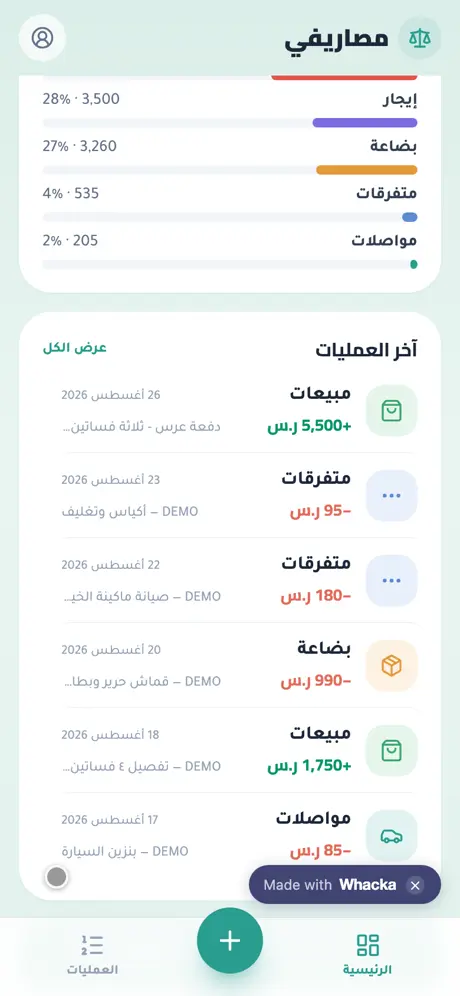
We typed one paragraph into whacka describing what a small-business owner who loses track of money needs, and this app came out complete — then we ran a real cycle through it: recorded a 5,500 SAR income entry in seconds and watched the month’s net flip from red to green, then exported the month’s PDF statement:
What came out of that one paragraph — as is, with no manual code editing:
- An entry in seconds: income or expense, the amount, a one-tap category (rent, salaries, goods, transport, misc — plus sales and services for income), the date, and a short note.
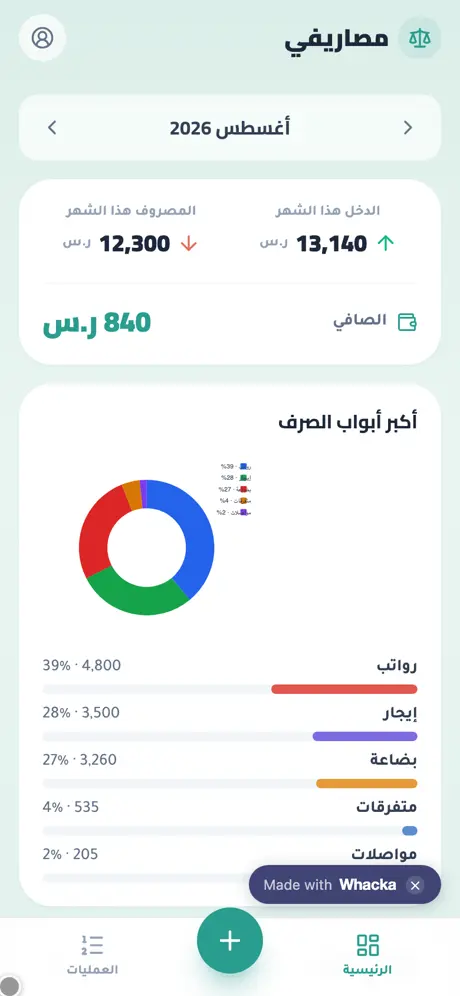
- A home screen that answers immediately: the month’s total income, spending and net, with one-arrow navigation between months.
- A spending-breakdown chart: a donut with percentages and a bar per category — “salaries 39%, rent 28%” at a glance.
- The month’s statement as a PDF, one button: a file with the summary, the chart and a table of every entry — ready to send to your accountant on WhatsApp.
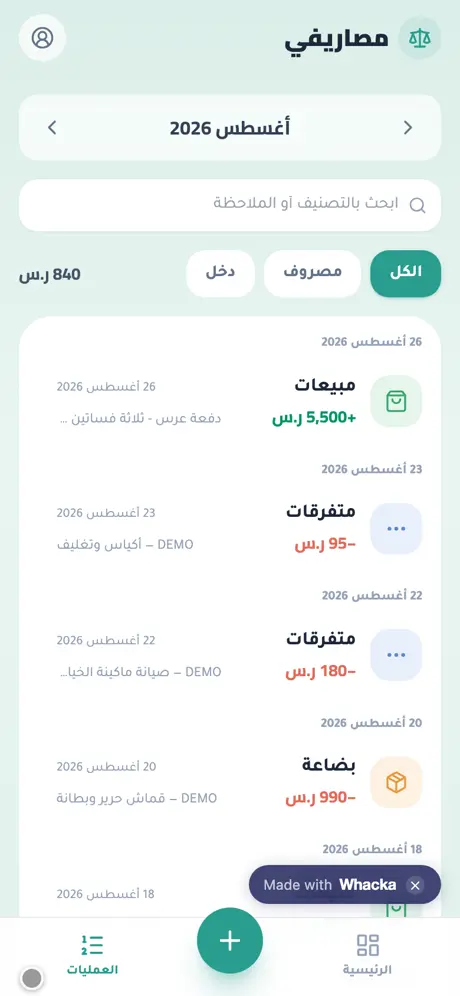
- A day-grouped entries screen: search by category or note, income/expense filters, and any entry opens for editing or deletion.
- In Saudi riyals — and the currency changes with one sentence in the chat if you’re on pounds, dirhams or dinars.
- Your book lives in your account: sign-in keeps your financial data safe and available on all your devices.
The sign-in screen’s “quick try” button opens the whole app with sample data kept on your device only — flip through months, try entries and charts with no account, without touching anyone’s real book.
The paragraph that made it — copy it and reshape it
This is the full text that was typed into whacka, and everything above came out of it (it was written in Arabic; here it is in English):
I have a small business and at the end of the month I don’t know where the money went. I want a simple Arabic app where I record every income or expense in seconds: the amount, the category (rent, salaries, goods, transport, misc), the date, and a short note. I want a home screen showing total income, spending and net for this month, a chart of the biggest spending categories, and a PDF export of the month’s statement to send to my accountant.
How to use it: copy the paragraph, paste it into whacka, and before sending, change what’s between the lines to match your situation: for personal and household money, “a small business” becomes “I want to control my personal spending” and the categories become “food, fuel, bills, kids, outings”; add “a monthly budget per category with an alert when I’m close to exceeding it” if you want ceilings; add “a payment field: cash, card or transfer”. Plain sentences — no fields, no settings — and every sentence you write becomes part of your app.
And once it’s built, you refine it the same way: “compare the last three months in one chart” or “remind me every evening to record my spending” — type it in the chat and your app changes.
Honestly: what it doesn’t do
- It doesn’t read your bank account. No bank connections, no automatic transaction pulls — you do the recording, which is exactly why it works in any country and with cash. An entry takes seconds, but they’re your seconds.
- It is not tax accounting software. The PDF is an operational statement summarizing your month for your accountant — no double-entry books, no filings.
- It needs internet. It’s a web app installed to the home screen, and your data lives in your account rather than one device — open it from the phone and the computer alike.
Frequently asked questions
Is it free? Starting is free with no card: daily credits refresh and cover describing, building, trying and publishing your app. Paid plans are for heavy building — details here.
Does it work for personal spending, not just businesses? Yes — the same paragraph with your household categories (food, bills, fuel…) gives you a personal expense app; the whole difference is the sentences you write.
Does it work on iPhone and Android? Yes — it’s a link that opens in any browser and installs to the home screen as an icon on both, no app stores involved.
My spouse and I record together — possible? As built, it serves one account. Type “let a second person sign in with their own account and record into the same book” in the chat and it gets added.
Related: if your business is a shop with daily sales and customer debts, the closer fit is an accounting app for a small shop — it combines the daily book and the debts. If your problem is swelling Excel sheets, read turn an Excel file into an app. Or start from the beginning: what an AI app builder actually does.