Restaurant app for a small place — table orders reach the kitchen without paper
How many orders got scribbled on paper and reached the kitchen wrong this week? The “no onions” note vanished in the rush, table 5 got table 7’s plate, and at closing time you’re adding up paper bills with a calculator to learn what you sold. The restaurant works — but every order lives on a slip of paper walking between the floor and the kitchen, and every hand-off is a chance to lose it.
This page won’t explain “how to choose restaurant POS software”. Instead, we’ll show you a system made from a single paragraph of plain description — with the exact text that made it — so you can copy that paragraph and make your own, shaped to your restaurant, in minutes.
The app: “Sufra”
We typed one paragraph into whacka describing what a paper-run restaurant needs, and this system came out complete — then we ran a real service cycle through it: opened a table, added items with a “no onions” note, sent them to the kitchen, watched the order move across the kitchen display, and closed the table with a printed bill:
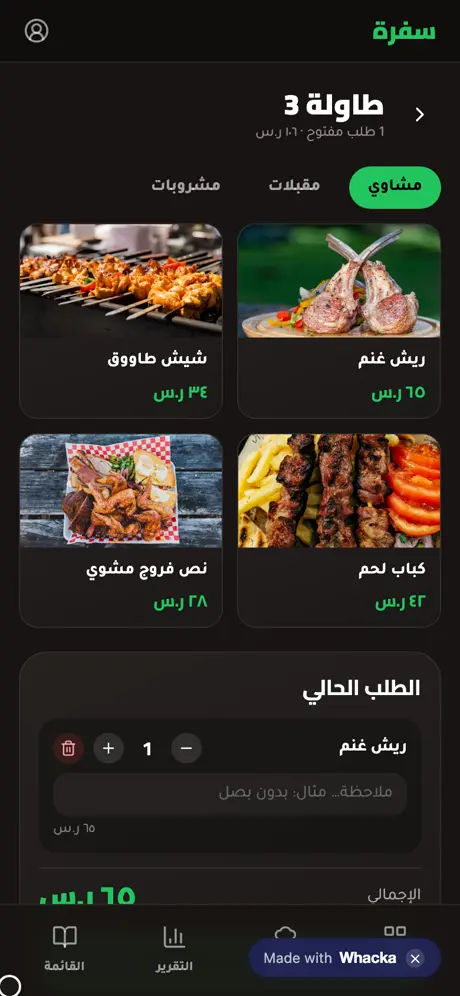
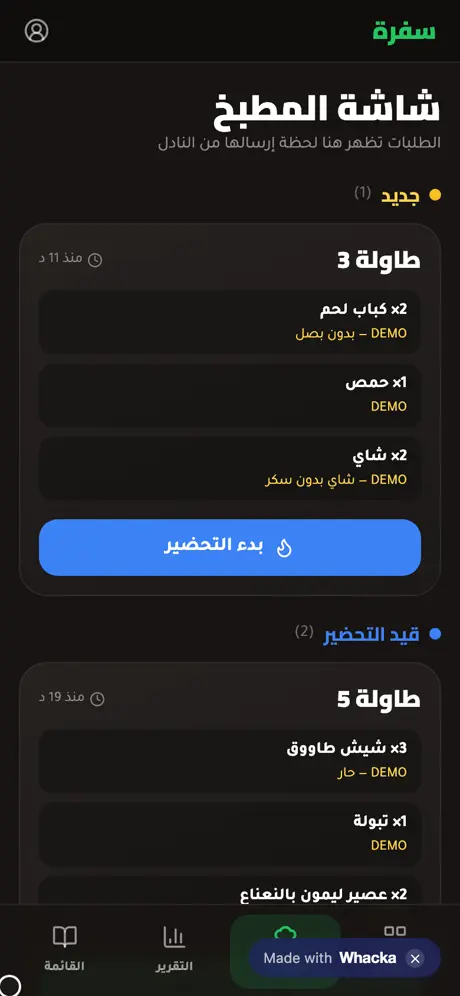
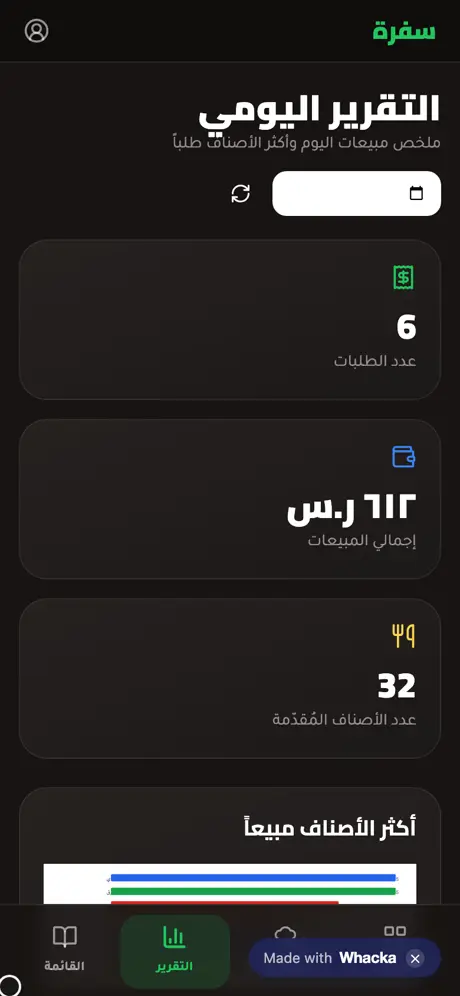
What came out of that one paragraph — as is, with no manual code editing:
- A table grid: every table with its state (empty, occupied, ready to serve), its open orders and its running total.
- A waiter screen with the menu: sections (grills, starters, drinks) with real photos; one tap adds an item, with a quantity and a note per item — “no onions” is typed once and reaches the kitchen in writing.
- A live total as you add, then one tap sends the order to the kitchen.
- A realtime kitchen display: the order appears in the “new” column the moment it’s sent, with the table number and waiting time, and moves with one tap to “preparing” and “ready” — the waiter sees the change instantly.
- Bill and close: one button collects all the table’s orders into a printable bill and frees the table.
- A daily report: order count, total sales and best-selling items, for any day you pick.
- Menu management from a phone: change prices or hide a sold-out item right in the app.
- A public digital menu: a separate link customers open with no sign-in, plus a print-ready QR sheet — details on the menu page.
- Staff screens are owner-only: sign-in protects your orders and reports; visitors only ever see the menu.
Even the staff side has a “quick try” button that shows the waiter, kitchen and report screens from the inside with sample data kept on your device only — no sign-up, and it never touches the restaurant’s real orders.
The paragraph that made it — copy it and reshape it
This is the full text that was typed into whacka, and everything above came out of it (it was written in Arabic; here it is in English):
I have a small restaurant and the waiters write orders on paper, and some get lost in the kitchen. I want an Arabic mobile app: the waiter picks the table number, then adds items from a sectioned menu (grills, starters, drinks) with a note per item like “no onions”. The total is computed live, and the order appears on the kitchen screen with a status (new, preparing, ready). I want to close the table and print the bill, and a daily report with the number of orders and the best-selling items.
How to use it: copy the paragraph, paste it into whacka, and before sending, change what’s between the lines to match your place: “grills, starters, drinks” becomes “pizza, pastries, desserts” if that’s your menu; add “and a takeaway section with the customer’s phone number” if you do takeaway; “12 tables” becomes your count, or “two halls: families and singles” if that’s your layout. Plain sentences — no fields, no settings — and every sentence you write becomes part of your system.
And once it’s built, you refine it the same way: “add a call-the-cashier button on the waiter screen” or “show 15% VAT on the bill” — type it in the chat and your system changes.
Honestly: what it doesn’t do
- It is not a certified fiscal cash register. The bill here is a simple operational receipt you print for the customer; if your country mandates certified e-invoicing (like Saudi Arabia’s or Egypt’s systems), your official setup stays as it is — this organizes the floor and the kitchen.
- It doesn’t drive thermal receipt printers directly. Printing goes through the browser (and saves to PDF); the kitchen display itself replaces the kitchen printer.
- It needs internet. It’s a web app installed on every waiter’s phone and the kitchen screen, and your data lives in your account rather than on one device.
Frequently asked questions
Is it free? Starting is free with no card: daily credits refresh and cover describing, building, trying and publishing your system. Paid plans are for heavy building — details here.
How do waiters and the kitchen use it together? It’s one link that opens on any device: a phone for each waiter, a tablet or screen in the kitchen. An order sent from any phone appears on the kitchen display instantly.
Does it work on iPhone and Android? Yes — it opens in any browser and installs to the home screen as an icon on both, no app stores involved.
I have more sections, or more than 12 tables — will it fit? The paragraph is yours to edit before sending: write your real table count and your real sections, and the system is built around them from the start.
Related: customers asking for a menu they can open on their phones? Read a QR digital menu — made from this same system. If your business is delivery and outside orders more than tables, the closer fit is an online store for a small business. Or start from the beginning: what an AI app builder actually does.