Online store for a small business — takes orders instead of scattered WhatsApp messages
How many orders slipped through your chats this month? A customer asked for the price and you answered too late; an order is written down somewhere in a conversation you can’t find; “did my parcel ship?” means searching three threads. The selling works — but the orders live in a place designed for chatting, not for selling.
This page won’t explain “how to choose an e-commerce platform”. Instead, we’ll show you a store made from a single paragraph of plain description — with the exact text that made it — so you can copy that paragraph and make your own, shaped to what you sell, in minutes.
The store: “Dokkani”
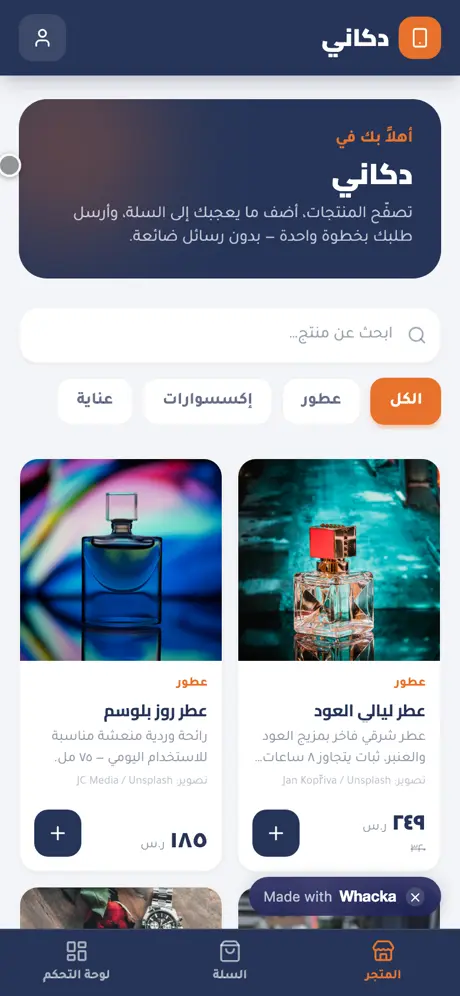
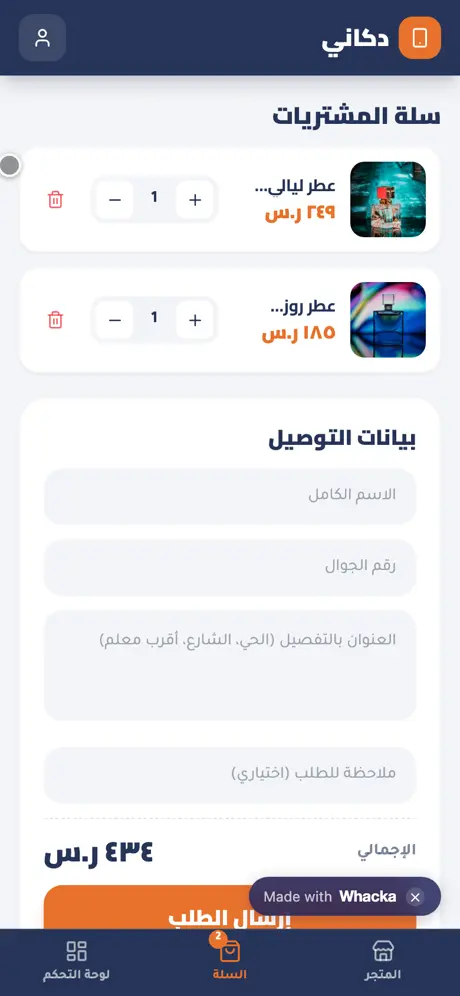
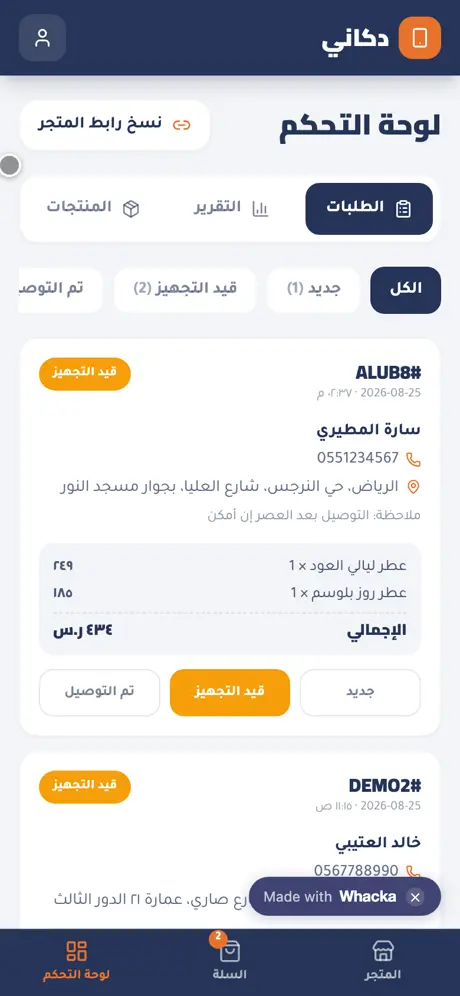
We typed one paragraph into whacka describing what a WhatsApp seller needs, and this store came out complete — then we ran a real sales cycle through it: browsed, put two items in the cart, ordered with a name and address, then opened the dashboard and moved the order forward with one tap:
What came out of that one paragraph — as is, with no manual code editing:
- A storefront with sections: every product with its photo, price and category, plus search and one-tap section filters.
- A one-step cart: customers add items, adjust quantities, and watch the total update.
- Ordering with name, phone and address: one delivery form; on submit the customer gets an order number — we tried it ourselves and got order #ALUB8, 434 SAR.
- A dashboard with statuses: each order arrives with the customer’s details and items; its status changes with one tap (new → preparing → delivered), with live counters per status.
- A daily report: today’s order count, today’s revenue, and a seven-day sales chart.
- Product management from a phone: add and edit products, photos and prices right in the dashboard.
- One link for your bio: a “copy store link” button sits at the top of the dashboard — paste it into your Instagram bio or WhatsApp status and you’re done.
- The dashboard is owner-only: sign-in protects your orders; visitors only ever see the storefront.
The storefront is open to anyone — add to cart and send a test order if you like. Even the dashboard has a “quick try” button that shows it from the inside with sample data kept on your device only — no sign-up, and it never touches the store’s real orders.
The paragraph that made it — copy it and reshape it
This is the full text that was typed into whacka, and everything above came out of it (it was written in Arabic; here it is in English):
I sell my products over WhatsApp and orders get lost between messages. I want a mobile store in Arabic: I display products with photos and prices organized into sections, the customer adds to a cart and sends the order with their name, phone and address. Orders reach me in a dashboard with statuses (new, preparing, delivered) and I change the status with one tap. I want a single link I can put in my bio, and a daily report with the number of orders and total sales.
How to use it: copy the paragraph, paste it into whacka, and before sending, change what’s between the lines to match what you sell: “my products” becomes “abayas”, “home-cooked food” or “spare parts”; add “with a 15 SAR delivery fee inside the city added to the total” if you deliver; add “and a size field on each product” if you sell clothes. Plain sentences — no fields, no settings — and every sentence you write becomes part of your store.
And once it’s built, you refine it the same way: “let the customer choose cash on delivery or bank transfer” or “notify me on every new order” — type it in the chat and your store changes.
Honestly: what it doesn’t do
- It doesn’t bring you customers. This is your store on your own link — its power is organizing the orders that already come from your bio, your status and your groups. It’s not a marketplace showing your goods to strangers.
- Cash on delivery is the default. The order arrives with the customer’s details and you settle payment the way you already do; if you want online payment inside your store, you describe it later as a change — it runs through your own Stripe or PayPal account, and the money goes straight to you.
- It needs internet. It’s a web app that installs to the phone’s home screen, and your data lives in your account rather than on one device — which is exactly what keeps your orders safe if the phone is lost.
Frequently asked questions
Is creating the store actually free? Starting is free with no card: daily credits refresh and cover describing, building, trying and publishing your store. Paid plans are for heavy building — details here.
Does it work on iPhone and Android? Yes — your store is a link that opens in any browser and installs to the home screen as an icon on both, no app stores involved.
How do orders reach me? Each order appears instantly in your dashboard as “new”, with the customer’s name, phone, address and note — you contact them directly and move the status forward as you prepare it.
My customers live on WhatsApp — do they have to leave it? They don’t; put the store link in your WhatsApp status and your auto-reply. The difference is the order arrives structured — items, address, total — instead of “I want the one in the second photo”.
Related: if your work is quotes and invoices more than goods, read an invoice app for a small business — with a printable quote template. If it’s appointments, here’s a booking app for a small business; if it’s a restaurant serving tables, here’s a table-orders and kitchen system; if your worry is the shop’s book and customer debts, here’s an accounting app for a small shop. Or start from the beginning: what an AI app builder actually does.