An online quiz for your students from one sentence — a link, auto-graded, straight into your gradebook
Five short questions at the end of the lesson, then thirty papers to grade at home, then the marks copied into the register, then copied again into the end-of-term sheet. The quick quiz that was supposed to save you time costs you an evening every week.
This page won’t list “the best online quiz makers”. Instead, we’ll show you an app made from a single paragraph of plain description — with the exact text that made it — so you can copy that paragraph and make your own, shaped to your subject and your classes, in minutes.
The app: “Saffi” (My Class)
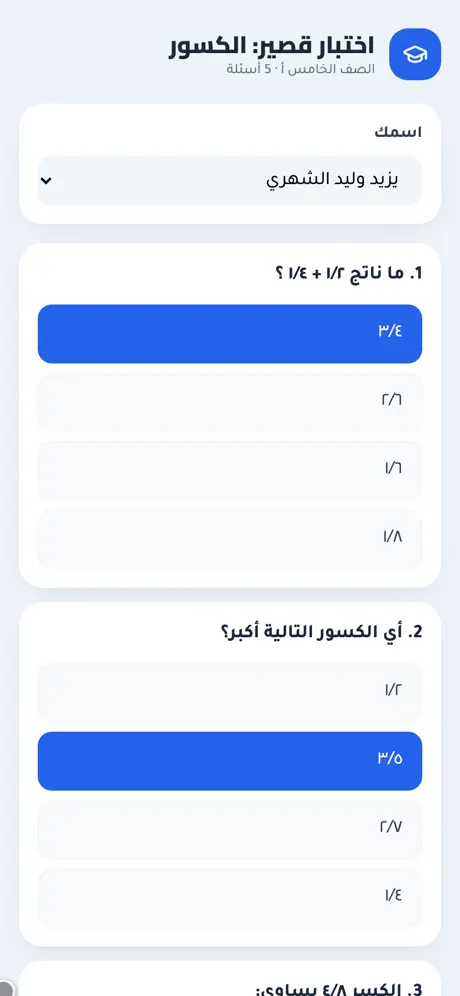
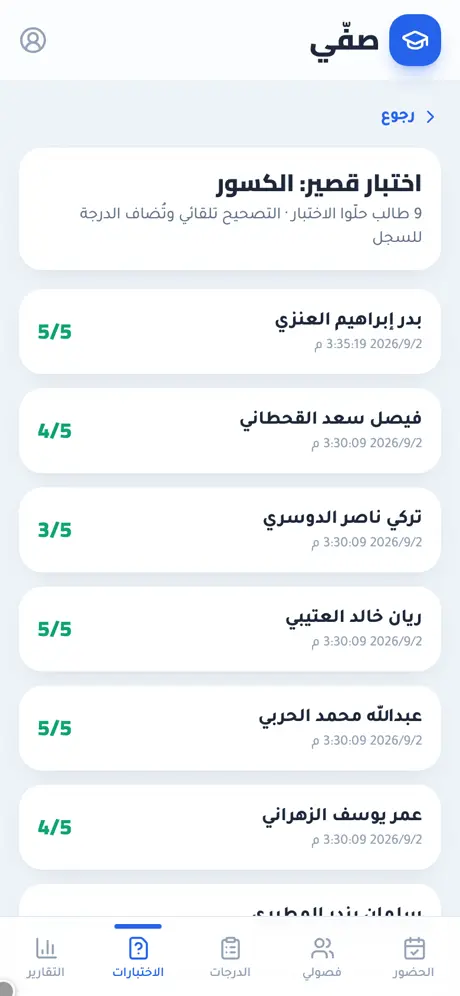
We typed one paragraph into whacka describing what a teacher who keeps attendance and grades on paper needs, and “Saffi” came out complete — then we tried it from both sides: created a five-question quiz on fractions, opened its link from another phone as a student and answered it, then went back to the teacher’s screen and found the score graded and added to the student’s record:
What came out of that one paragraph — as is, with no manual code editing:
- A multiple-choice quiz in a minute: type the question, its options and the correct answer, and a link is generated — copy it or send it with a WhatsApp button. The correct answers are stored in your own record, not in the link.
- Students answer from their phone, no account: open the link, pick your name from the class list, tap the options, send — and see “your answers were received”. We actually did it: answered as “Badr” from a device that had never signed in.
- Auto-graded, and the score enters the gradebook by itself: on the results screen “Badr” appeared instantly with 5/5 and a submission time; on the grades screen his grade count went from 4 to 5 and his average from 80% to 84% — with a row carrying the quiz’s name and date. We didn’t type a single number.
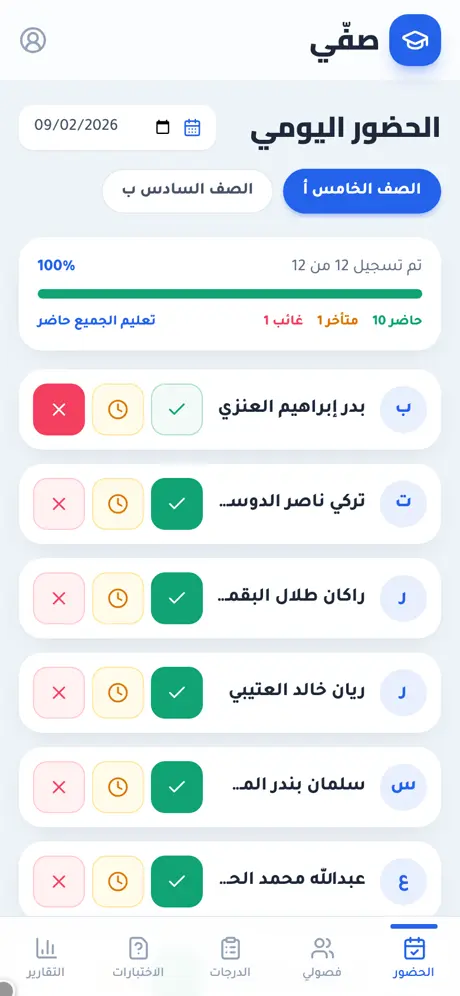
- Daily attendance with one tap: three large buttons per student (present / late / absent), counters, a progress bar and a “mark everyone present” button. We tapped “absent” for one student and the counters changed that instant from 11/1/0 to 10/1/1.
- Your classes and students from a file: add a class, then students by hand or upload a names file (Excel/CSV) with a “name” column and an optional “phone” column for the parent — re-uploading the same file doesn’t duplicate anyone.
- Grades and notes per student: tests, homework and participation, each score “out of”, and a quick behavior note (positive or needs follow-up).
- A report per student: attendance rate, average and a class chart, a “PDF report” button that prepares and saves the file, and a “WhatsApp the parent” button that opens the parent’s chat with a ready summary message (name, class, attendance rate, average).
- The dashboard is the teacher’s alone: sign-in protects it; the quiz link stays public for your students.
The quiz link is open to any visitor — pick any name from the list and answer. The teacher dashboard at saffi.whacka.app has a “quick try, no sign-up” button that shows it from the inside with sample data kept on your device only, with a clear banner at the top and reset and exit buttons — it never touches the teacher’s real data.
The paragraph that made it — copy it and reshape it
This is the full text typed into whacka, and everything above came out of it (it was written in Arabic; here it is in English):
I’m a teacher and I record attendance and grades on paper, then copy them again at the end of the term. I want an Arabic app: I add my classes and student names (or upload them from a file), then record attendance daily with one tap per student (present, absent, late). I record test and homework grades for each student and a quick behavior note. And I want to create a short online quiz of multiple-choice questions, send it to students as a link, they answer it from their phones under their names, it’s graded automatically and the score goes into the record. I want a screen showing each student’s attendance rate and average, and a report per student that I export as PDF and share with the parent on WhatsApp.
How to use it: copy the paragraph, paste it into whacka, and before sending, change what’s between the lines to match your subject: if you only want the quiz, drop the attendance sentence; add “questions can include an image” for science; add “a ten-minute timer, then the quiz closes” or “one attempt per name”; add “true/false and fill-in-the-blank questions” if multiple choice isn’t enough; or “a QR scanner in class records attendance” instead of the buttons. Plain sentences — no fields, no settings — and every sentence you write becomes part of your app.
And once it’s built, you refine it the same way: “add a question bank and pick five at random per student” or “send me the class attendance summary every day at 2” — type it in the chat and your app changes.
Honestly: what it doesn’t do
- The quiz link trusts the name that’s picked. A student picks their name from the list and isn’t asked for a password — it’s a classroom quiz, not a proctored exam: anyone with the link can answer under any name. Ask in the chat for “a code per student” or “one attempt per name” if you need it.
- WhatsApp doesn’t attach the PDF automatically. The WhatsApp button opens the parent’s chat with the summary written; the report file is saved from the PDF button and you attach it yourself in the chat — that’s how WhatsApp works on the web, not an empty promise.
- It doesn’t take attendance by itself. The teacher taps; there’s no student app and no smart card. Students don’t need an account at all — they only open the quiz link.
Frequently asked questions
Do students need an account or an app? No — the quiz link opens in any phone’s browser; the student picks their name and answers. Accounts are only for you (the teacher dashboard).
Does it work on phones and computers? Yes; it was designed phone-first (large buttons for one-handed attendance) and opens in any browser. It can be installed to the home screen as an app.
Where are the correct answers stored? In your own record inside the app, not in the link students receive — so a student can’t see them from the link.
How many classes and students can I add? The demo app has two classes of 12 students each; there’s no built-in limit, and the free tier is enough for one teacher’s classes.
Is it free to use? Starting is free, and your app is published on its own link. Details on the pricing page.
Related: if attendance and grades matter more to you than the quiz, this page is about the teacher’s register: attendance, grades and behavior notes from the same app. And if you’re a private tutor taking bookings over WhatsApp: a booking app for a small business. Or start from the beginning: what an AI app builder actually does.