Booking app for a small business — customers book from a link, conflicts are impossible
“When are you free?” — “Thursday at 5?” — “Taken. 5:30?” — and between those two messages, another customer booked the same slot from a different chat. Bookings over WhatsApp mean your appointment book is scattered across twenty conversations, and a clash isn’t a risk — it’s a matter of time.
This page won’t explain “how to choose a booking system”. Instead, we’ll show you a system made from a single paragraph of plain description — with the exact text that made it — so you can copy that paragraph and make your own, shaped to your work, in minutes.
The app: “Salon Lamsa”
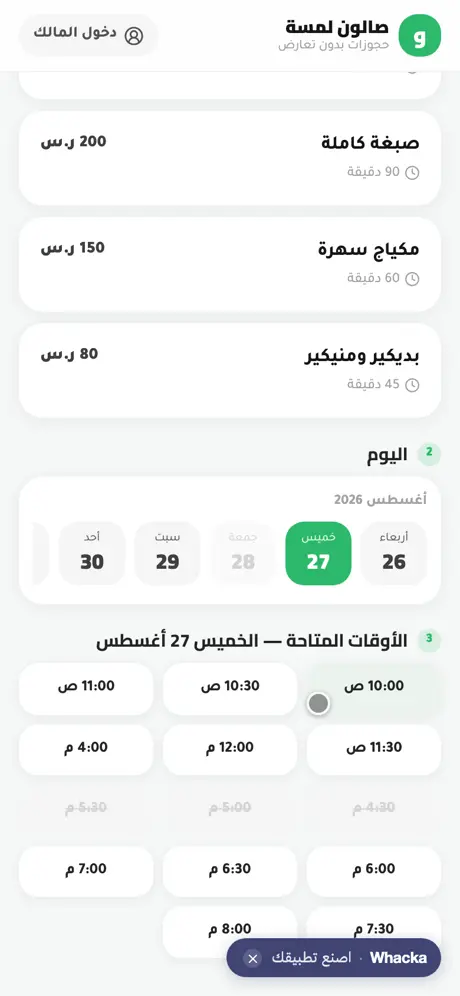
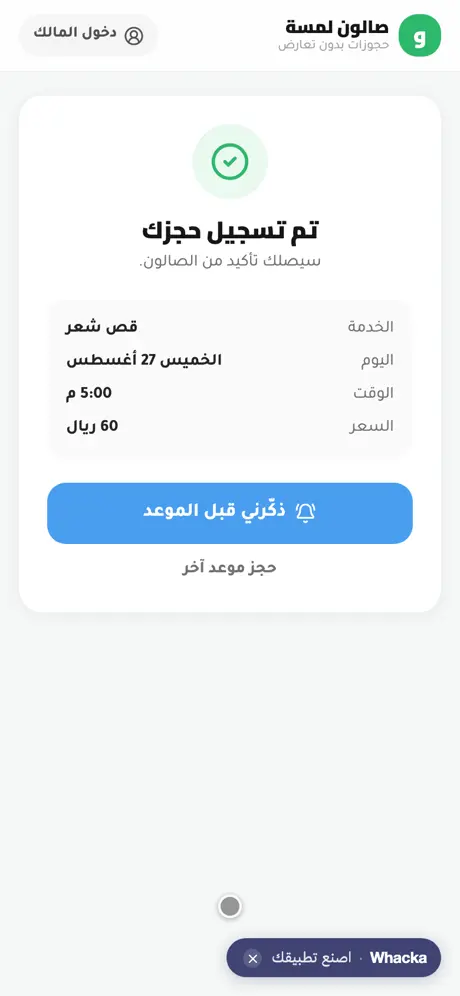
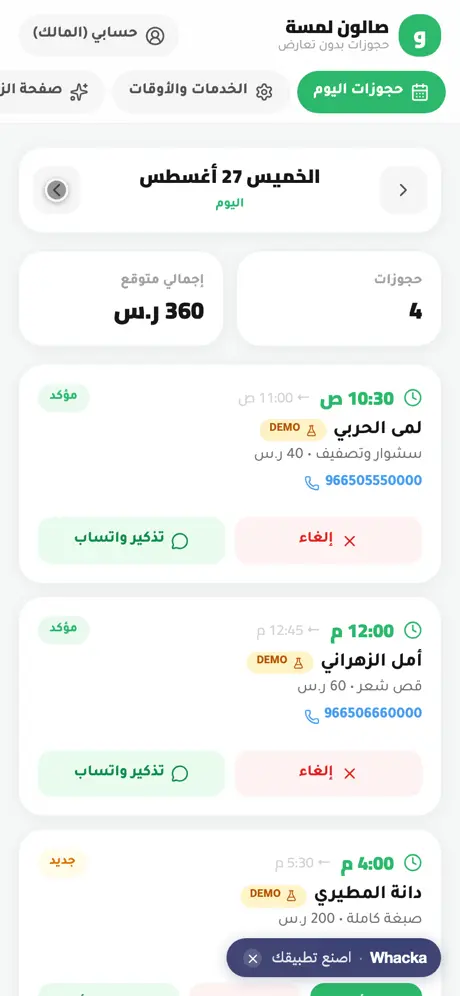
We typed one paragraph into whacka describing what a salon owner drowning in WhatsApp bookings needs, and this system came out complete — then we tried it from both sides: booked a Thursday 5pm haircut as a customer, then opened the owner’s dashboard, confirmed one booking, cancelled another, and opened a ready-made WhatsApp reminder:
What came out of that one paragraph — as is, with no manual code editing:
- A booking link for customers: open the page, pick a service (with price and duration), then a day from a 21-day strip, then a time — and only free times show: taken slots are struck through, and break hours, the closed day and times already past aren’t offered at all.
- Conflict blocking that understands durations: we booked a 45-minute haircut at 5:00 and 4:30, 5:00 and 5:30 all got struck — because any of them would overlap. And if two people tap the same slot at the same moment, the first wins and the second gets a clear rejection.
- Customers book with a name and phone — no account, no app to install, with an instant on-screen confirmation and a “remind me before my appointment” button.
- A day view ordered by time: every booking with its name, phone, service and price, plus a bookings counter and the day’s expected total, with day-to-day navigation.
- Confirm and cancel with one tap: the status changes in front of you (new → confirmed → or cancelled with a re-confirm button), and the counters update instantly.
- Ready-made WhatsApp reminders: a button on every booking opens WhatsApp with a confirmation or reminder message already written with the customer’s name and time — you press send.
- All settings from a phone: working hours per day with a break and a closed day, and services with names, durations and prices.
- The dashboard is the owner’s alone: sign-in protects it; the booking page stays public for your customers.
The booking page is open to any visitor — pick a service and make a test booking if you like. The owner dashboard has a “quick try” button that shows it from the inside with sample data kept on your device only — no sign-up, and it never touches the real bookings.
The paragraph that made it — copy it and reshape it
This is the full text that was typed into whacka, and everything above came out of it (it was written in Arabic; here it is in English):
I have a salon and I take bookings over WhatsApp, so appointments clash. I want an Arabic app: I set working hours and each service’s duration and price, and the customer opens the link, picks the service, the day and only an available time, and books with her name and phone. The app prevents booking the same time twice. I want a screen showing today’s bookings ordered by time, the ability to confirm or cancel a booking, and a reminder for the customer before the appointment.
How to use it: copy the paragraph, paste it into whacka, and before sending, change what’s between the lines to match your work: “a salon” becomes “a dental clinic”, “a private tutor” or “an oil-change garage”; “each service’s duration” becomes your full-hour lesson; add “a 50-riyal deposit mentioned in the confirmation” if you take deposits; add “customers can cancel with their phone number up to four hours before”. Plain sentences — no fields, no settings — and every sentence you write becomes part of your system.
And once it’s built, you refine it the same way: “add two staff members, each with her own schedule” or “send me tomorrow’s bookings as a notification every evening” — type it in the chat and your system changes.
Honestly: what it doesn’t do
- The customer’s automatic reminder has conditions. The “remind me” button works as a notification on the customer’s phone after they install the app to their home screen — that’s how the web actually works, not an empty promise. The always-reliable path: the WhatsApp reminder button in your dashboard — message ready, you press send.
- It doesn’t send WhatsApp on your behalf. Every WhatsApp message opens pre-written and you press send — nothing reaches your customer unseen. Automated sending from a business number is possible as a later addition, with registration requirements and per-message fees.
- It doesn’t bring you customers. This is your link for your bio, your status and the counter — it organizes the bookings already coming to you; it’s not a marketplace showing you to strangers.
Frequently asked questions
Is it free? Starting is free with no card: daily credits refresh and cover describing, building, trying and publishing your system. Paid plans are for heavy building — details here.
Do my customers need to install an app? No — the link opens in any phone’s browser and they book in seconds. Installing to the home screen is optional (needed only for the reminder notification).
My hours change every week? Working hours are edited per-day in settings at any time — and the times shown to customers follow immediately.
I have more than one staff member? As built, there’s one schedule. Type “give each staff member her own schedule and let the customer choose who to book with” in the chat and it gets added.
Related: if your business is orders more than appointments, read an online store for a small business; if it’s a restaurant, here’s a table-orders and kitchen system. And for the money side once the calendar is in order: an expense tracker app. If you’re a tutor, the classroom side is here: a teacher’s register with an online quiz. Or start from the beginning: what an AI app builder actually does.