The teacher's register: attendance, grades and behavior notes — from one paragraph, with a parent report on WhatsApp
The attendance book in the bag, grades in a second book, and a note about a student written in the margin of a page that got lost. At the end of the term you sit up a whole night copying it all into one sheet and working out percentages on a calculator — then a parent asks how their child is doing and you answer from memory.
This page won’t explain “how to organize a teacher’s planner”. Instead, we’ll show you a register made from a single paragraph of plain description — with the exact text that made it — so you can copy that paragraph and make your own, shaped to your classes, in minutes.
The app: “Saffi” (My Class)
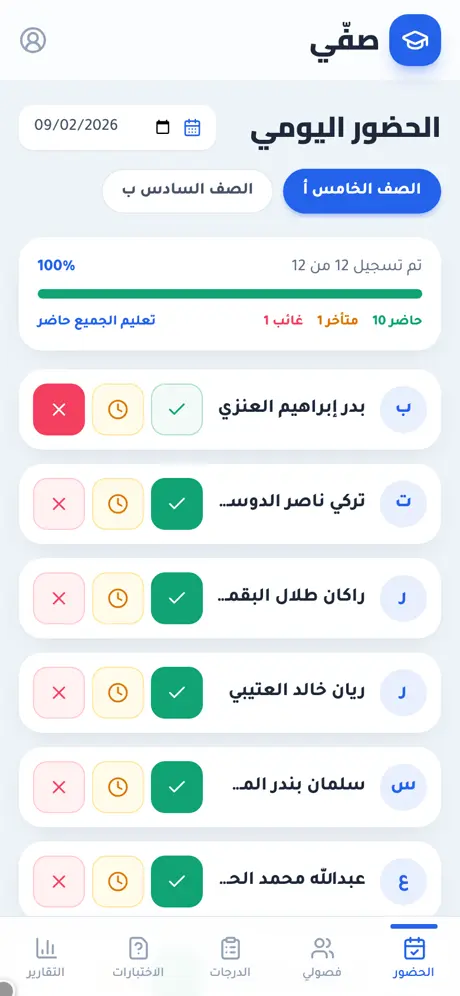
We typed one paragraph into whacka describing what a teacher drowning in paper needs, and “Saffi” came out complete — then we tried it from both sides: took attendance for class 5-A from a phone, recorded a grade, opened a student’s report and pressed the parent’s WhatsApp button, then opened a quiz link as a student from another device:
What came out of that one paragraph — as is, with no manual code editing:
- Attendance with one tap, one-handed: pick the class and the date; each student has three large buttons (present / late / absent), with counters above, a “12 of 12 recorded” bar and a “mark everyone present” button — then you fix the exceptions. We tapped “absent” for one student and the counters changed that instant from 11/1/0 to 10/1/1.
- Your classes from the names file you already have: add a class, then upload an Excel or CSV file with a “name” column and an optional “phone” column for the parent — or add students one by one. Re-uploading the same file doesn’t duplicate anyone.
- Grades “out of” and a behavior note on the same screen: open the student, choose test, homework or participation, type the score and the maximum, and add a quick note (positive or needs follow-up). The average updates immediately.
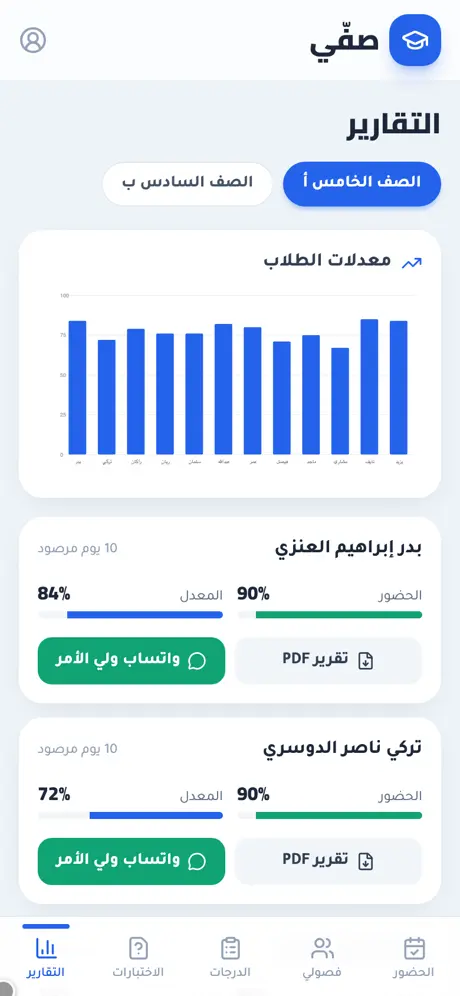
- Attendance rate and average per student, and a class chart: the reports screen shows, for every student, the days recorded, the attendance rate and the average, with a chart of the whole class’s averages above them.
- A PDF report and a WhatsApp button for the parent: “PDF report” prepares the student’s file (summary + grades table + notes) and saves it — we got “Badr’s report is ready and saved”; “WhatsApp the parent” opened the registered number’s chat with a ready message: student name, class, attendance rate 100%, average 80%.
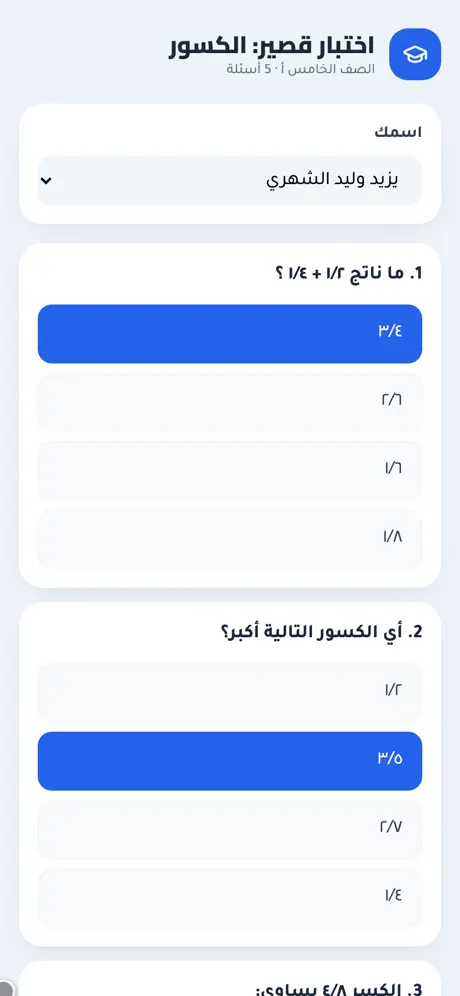
- A short online quiz that grades itself: write multiple-choice questions, a link is generated for students, they answer from their phones with no account, and each student’s score enters their record automatically — details and a live try on the online quiz page.
- The dashboard is the teacher’s alone: sign-in protects it, and a “quick try, no sign-up” button opens it for a visitor with sample data on their device only, with a clear banner and reset and exit buttons.
The paragraph that made it — copy it and reshape it
This is the full text typed into whacka, and everything above came out of it (it was written in Arabic; here it is in English):
I’m a teacher and I record attendance and grades on paper, then copy them again at the end of the term. I want an Arabic app: I add my classes and student names (or upload them from a file), then record attendance daily with one tap per student (present, absent, late). I record test and homework grades for each student and a quick behavior note. And I want to create a short online quiz of multiple-choice questions, send it to students as a link, they answer it from their phones under their names, it’s graded automatically and the score goes into the record. I want a screen showing each student’s attendance rate and average, and a report per student that I export as PDF and share with the parent on WhatsApp.
How to use it: copy the paragraph, paste it into whacka, and before sending, change what’s between the lines to match your reality: “present, absent, late” becomes “present, excused, unexcused”; add “behavior points accumulate per student with a weekly class ranking” if you use positive reinforcement; add “periods one to seven” if attendance is per period, not per day; for a kindergarten: “a message to the parent on arrival and pick-up”; for a principal: “an account per teacher and a whole-school absence summary”. Plain sentences — no fields, no settings — and every sentence you write becomes part of your register.
And once it’s built, you refine it the same way: “send me the names of anyone absent three days in a row” or “add a memorization field for the Quran subject” — type it in the chat and your app changes.
Honestly: what it doesn’t do
- It doesn’t take attendance by itself. The teacher taps; no smart card, no student app. That’s deliberate: students don’t need an account or anything installed.
- WhatsApp doesn’t attach the PDF automatically. The button opens the parent’s chat with the summary written; the file is saved from the PDF button and you attach it yourself in the chat — that’s how WhatsApp works on the web, not an empty promise. Automated sending from a business number is possible as a later addition, with registration requirements and per-message fees.
- It isn’t a full school system. This is one teacher’s register for their classes; no school timetable, no fees, no admin accounts. You can ask for “an account per teacher and a principal’s dashboard” in the chat, but that’s a different app.
Frequently asked questions
Do students or parents need an account? No. The account is yours only. The parent gets the summary on WhatsApp; the student opens the quiz link in a browser.
Does it work offline in class? It needs a connection to save; the screen is phone-first with large buttons so you can take attendance from your phone during the morning line-up. If the connection drops you get a readable error instead of a silent save.
I record attendance per period, not per day? As built, attendance is per day. Type “attendance per period, first to seventh” in the chat and it gets added.
How many classes can I add? There’s no built-in limit; the demo app has two classes of 12 students each, and the free tier is enough for one teacher’s classes.
Is it free to use? Starting is free, and your app is published on its own link. Details on the pricing page.
Related: the short quiz that grades itself and writes the score into this register: an online quiz for your students from one sentence. And if you run a tutoring centre rather than a class: a booking app for a small business for lessons, and a shop ledger for fees. Or start from the beginning: what an AI app builder actually does.