Free inventory app for a small shop — stock moves with every sale and warns you before it runs out
The item you were “sure there’s more of” — until a customer is standing in front of you and there isn’t. How many times this month? The notebook never warns you, the end-of-month count always shows a gap nobody can explain, and “how much is my stock actually worth?” is a long calculation you keep postponing.
This page won’t explain “how to choose inventory management software”. Instead, we’ll show you an inventory app made from a single paragraph of plain description — with the exact text that made it — so you can copy that paragraph and make your own, shaped to your goods, in minutes.
The app: “Makhzoni”
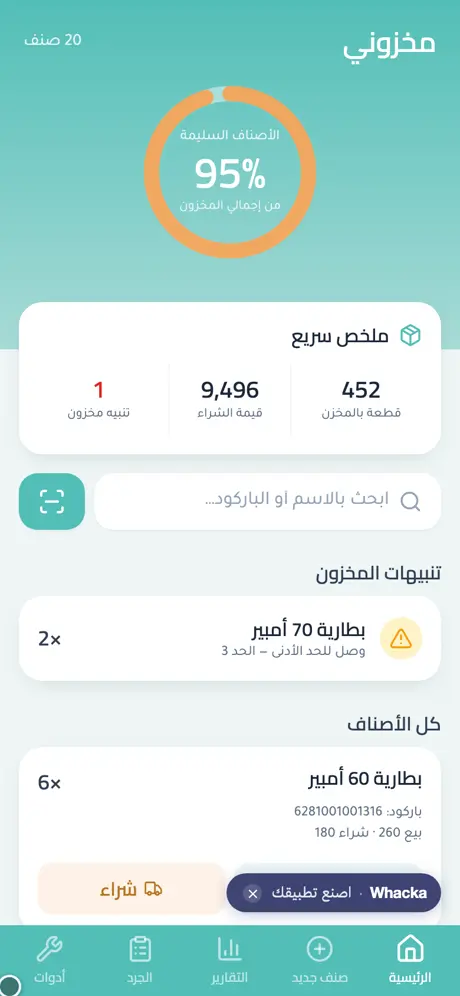
We typed one paragraph into whacka describing what a paper-notebook spare-parts shop needs, and this program came out complete — then we ran a real cycle through it: uploaded the Excel file holding 20 items and they all landed with their prices and quantities, then sold two batteries and watched the quantity drop by itself and a “reached minimum” alert appear:
What came out of that one paragraph — as is, with no manual code editing:
- A full item card: name, barcode, purchase price, sale price, quantity, and a minimum level.
- Sales and purchases that move stock by themselves: a sell and a buy button on every item — we sold two batteries and the count dropped from 4 to 2 on the spot.
- A clear warning before running out: any item touching its minimum shows up under “stock alerts” on the home screen, with a healthy-stock ring that changes color.
- Search by name or barcode, and a scan button that opens the phone’s camera straight onto the code.
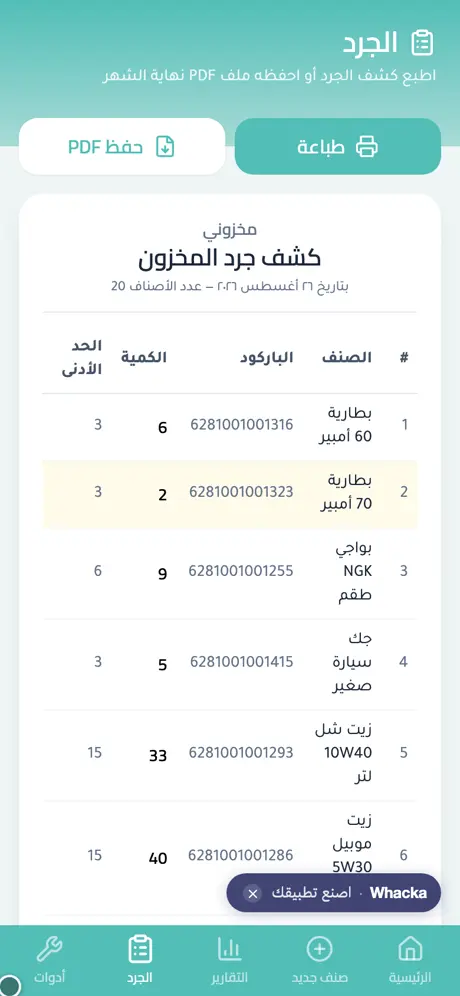
- A printable stocktake sheet: every item with its count and minimum, with print and save-PDF buttons — ready for the end of the month.
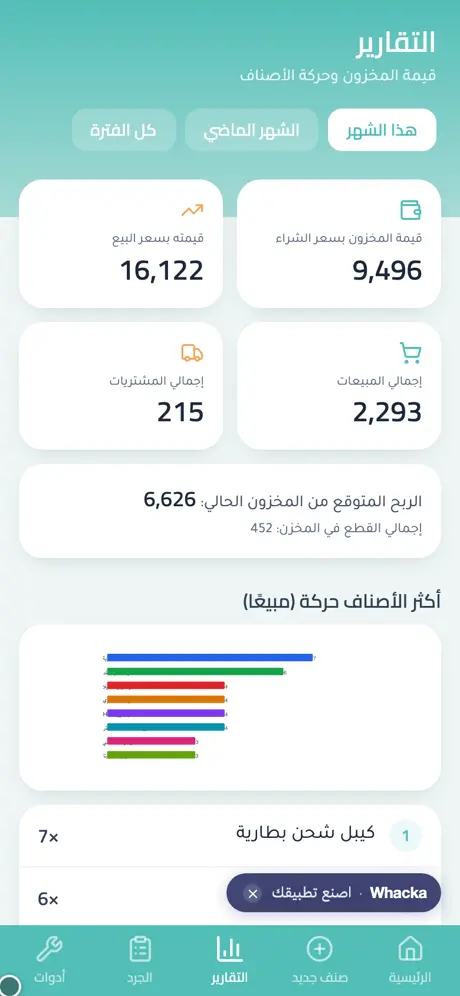
- An inventory-value report: what your stock is worth at purchase price and at sale price, the expected profit, and the most-moved items.
- Import from Excel: a tools screen where you upload your old file and the items land as they are — the full story here.
- Your stock is yours alone: owner sign-in, and visitors get a “quick try” with sample data on their device only.
The sign-in screen’s “quick try” button opens the whole app with sample data kept on your device only — try selling, alerts and the stocktake with no account, without touching anyone’s real stock.
The paragraph that made it — copy it and reshape it
This is the full text that was typed into whacka, and everything above came out of it (it was written in Arabic; here it is in English):
I have a spare-parts shop and I track inventory in a notebook. I want a simple Arabic app: I add an item (name, barcode, purchase price, sale price, quantity, minimum level). On a sale the quantity decreases automatically, and on a purchase it increases. I want a clear alert when any item reaches its minimum, and a stocktake sheet I print at the end of the month. I search by name or by scanning the barcode with the phone’s camera, and I want a report showing current inventory value and the most-moved items.
How to use it: copy the paragraph, paste it into whacka, and before sending, change what’s between the lines to match your goods: “a spare-parts shop” becomes “a food-supplies warehouse”, “a perfume shop” or “a veterinary pharmacy”; add “an expiry date per item with an alert a month before” if your goods expire; add “a storage location: shelf and number” if your warehouse is big. Plain sentences — no fields, no settings — and every sentence you write becomes part of your program.
And once it’s built, you refine it the same way: “add a supplier per item and a purchases report per supplier” or “I want a physical count screen where I type the counted quantity and see the difference” — type it in the chat and your program changes.
Honestly: what it doesn’t do
- It is not a POS with tax invoices. A sale here is a stock movement (decrease by so many pieces), not a certified register receipt; if you want a selling screen that prints a customer invoice, describe it as an addition.
- It doesn’t count your shelves for you. It computes exactly what you record, but the physical end-of-month count is still yours — the printable stocktake sheet was designed for exactly that round.
- It needs internet. It’s a web app installed to the home screen, and your data lives in your account rather than one device — a new phone opens onto the same stock.
Frequently asked questions
Is it actually free? Starting is free with no card: daily credits refresh and cover describing, building, trying and publishing your program. Paid plans are for heavy building — details here.
My items live in an Excel file — do I re-type them? No — on the tools screen you upload the Excel or CSV as it is, match the columns at a glance, and hit import. The full walkthrough.
Does it work on iPhone and Android? Yes — it’s a link that opens in any browser and installs to the home screen as an icon on both, no app stores involved.
Does barcode search need a scanner gun? No — the scan button opens the phone’s own camera onto the code; and if you have a USB reader that types into the search box, that works too, since search accepts the number.
Related: if your worry is customer debts and the shop’s daily book more than the shelves, read an accounting app for a small shop. If you sell online and take orders, here’s an online store for a small business. And the story of the file that escaped Excel: turn an Excel file into an app. Or start from the beginning: what an AI app builder actually does.