Paper leave forms travel between desks, and a balance kept in a spreadsheet is wrong by December. Describe your departments and who approves what, and whacka builds leave management software every employee opens on their phone: they request leave with its type, dates and reason, their manager approves, HR signs off, and the days come off their balance automatically.
You create each person’s login yourself — a username and password, no email needed — and give them a role. Employees see only their own requests and balance, managers only their department, and an approved request locks with who approved it and when. Free to start; free apps stay online for 14 days after each publish, and paid plans start at $3 a week.
Updated · October 27, 2026
Raha — leave for a company with two departments and an HR officer
Built from the message below — written in Egyptian Arabic — in about eight minutes. Open it and tap «جرّب التطبيق بدون حساب» (try it without an account): request leave as the employee, approve it as the department manager and then as HR, and watch the balance drop — with sample data that stays on your device. The app is in Arabic, as the message asked.
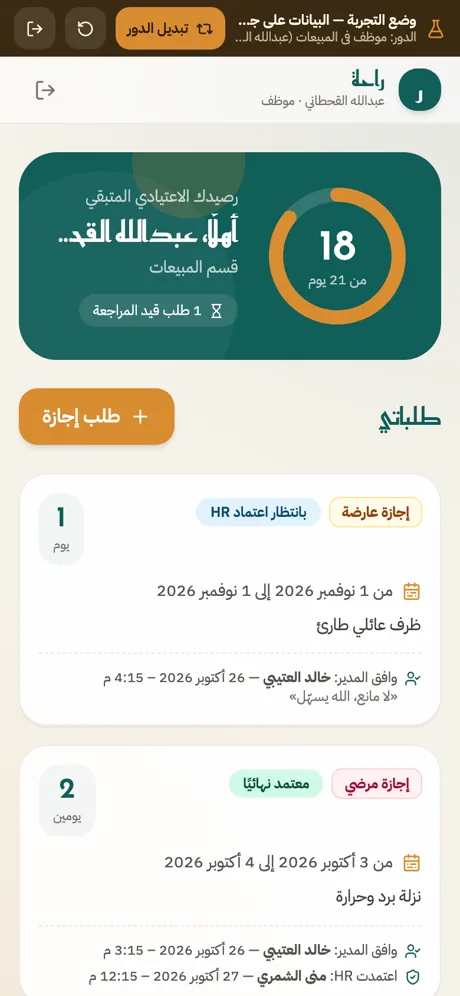
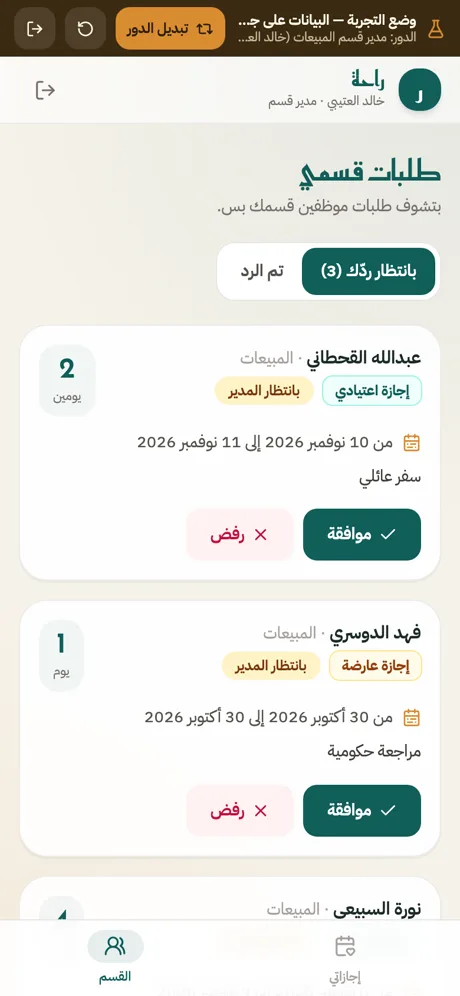
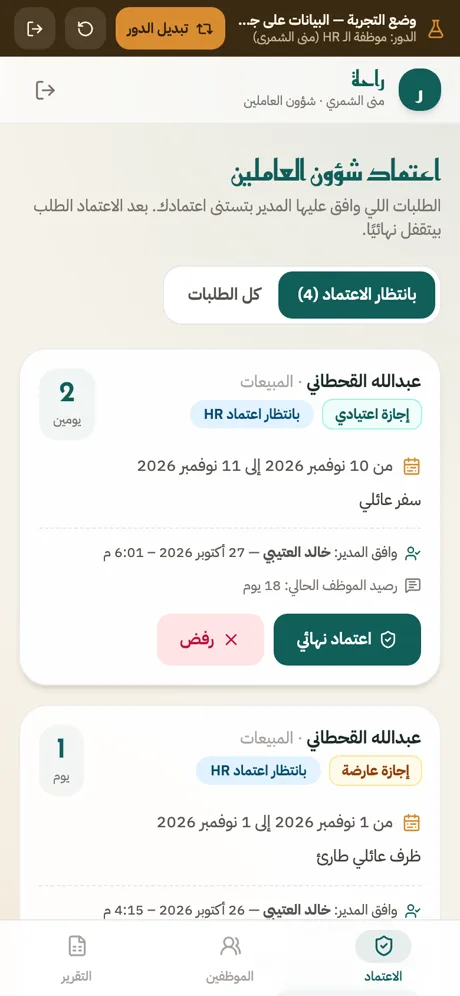
عايز تطبيق لإجازات الموظفين في الشركة عندي. عندنا قسمين: المبيعات والمخازن، وكل قسم ليه مدير، وعندنا موظفة شؤون عاملين (HR). اللي محتاجه: - أنا اللي بعمل حسابات الموظفين باسم مستخدم وباسورد، والـ HR كمان تقدر تضيف موظفين وتغيّر الباسورد. المديرين والموظفين لأ. - الموظف يقدّم طلب إجازة: النوع (اعتيادي / عارضة / مرضي)، من تاريخ لتاريخ، والسبب. - الموظف يقدر يعدّل طلبه أو يلغيه طول ما المدير لسه ما ردّش عليه. - مدير القسم يوافق أو يرفض طلبات موظفين قسمه هو بس، وما يشوفش طلبات القسم التاني. - بعد موافقة المدير الطلب يروح للـ HR للاعتماد النهائي، ولما تعتمده الأيام تتخصم من رصيد الموظف. - رصيد الاعتيادي ٢١ يوم في السنة. الـ HR بس هي اللي تحط الرصيد أو تعدّله، والرصيد ما ينفعش يبقى بالسالب. - بعد الاعتماد النهائي محدش يقدر يعدّل الطلب أو يمسحه، ولازم يتسجّل مين وافق وإمتى. - الموظف يشوف طلباته ورصيده هو بس، وما يشوفش حاجة تخص زمايله. - الـ HR تشوف كل الطلبات والأرصدة وتطلّع تقرير شهري Excel. التطبيق كله بالعربي.
- We signed in as every role with real accounts and also called the server directly, behind the screens: an employee can’t read colleagues’ requests or balances, and the sales manager can’t see the warehouse department’s requests
- An employee can’t approve their own request, and after HR’s final approval nobody can edit or delete it
- Who approved and when are recorded by the system and can’t be changed; only HR changes balances, and a balance never goes below zero
- In demo mode: a two-day request went through the manager and HR, and the employee’s balance went from 18 to 16
What you can build
Describe any of these — whacka builds it.
Good to know
Is it free?
Free to start: the free plan gives 8 credits a day (up to 24 a month) — enough to build, refine and publish a first app, with no card. On the free plan a published app stays online for 14 days after each publish; paid plans start at $3 a week or $10 a month. Running the app itself — data, storage, notifications — uses no credits.
How many staff logins can I create?
You create them yourself inside the app — a username and password per person, no email needed. They count against your Whacka account: 5 on Free, 10 on Starter, 30 on Pro and 100 on Ultra; for more, email wow@whacka.app.
Are the permissions real, or just hidden buttons?
The core rules in these apps — who sees what, who approves, and locking a request once it is approved — run on the server itself, not just on the screen. We tested them with real accounts for every role and tried to reach the data directly, behind the screens; what held is listed under the app above. When you build yours, spell out who sees what and who approves what, the way the message does.
Does it calculate leave balances?
It deducts the days on final approval from the balance HR sets for each person (21 days of annual leave in the app above) and won’t approve a request larger than the balance. Carry-over and accrual rules from your labour law go in your description.
What doesn’t it do?
It doesn’t run payroll or end-of-service calculations, and it doesn’t connect to a fingerprint clock. Push notifications on iPhone need the app added to the home screen first.